The guided tour

Come inside
the actual product.

The live demo of EmpireOS, the AI revenue operating system for B2B sales teams, is running below. Drive it yourself, or scroll past it and we will walk you through twelve real screens and tell you what you are looking at.

Live This is the running product on a real workspace. 40 open deals, $5.6M of open pipeline, 330+ closed deals with outcomes. It is a real dataset and it is not a customer's. Click anything.
Open it full screen

The live demo

A real workspace with real data in it, and it is not a customer's, opened straight into the working product. It is built for a laptop screen, so on a phone it opens in its own tab rather than in a frame this size.

Open the live demo

Which of these are you?

Optional. It picks the four screens most likely to decide it for you, and nothing is stored unless you ask us to send it.

1

You open the app and it already knows what matters

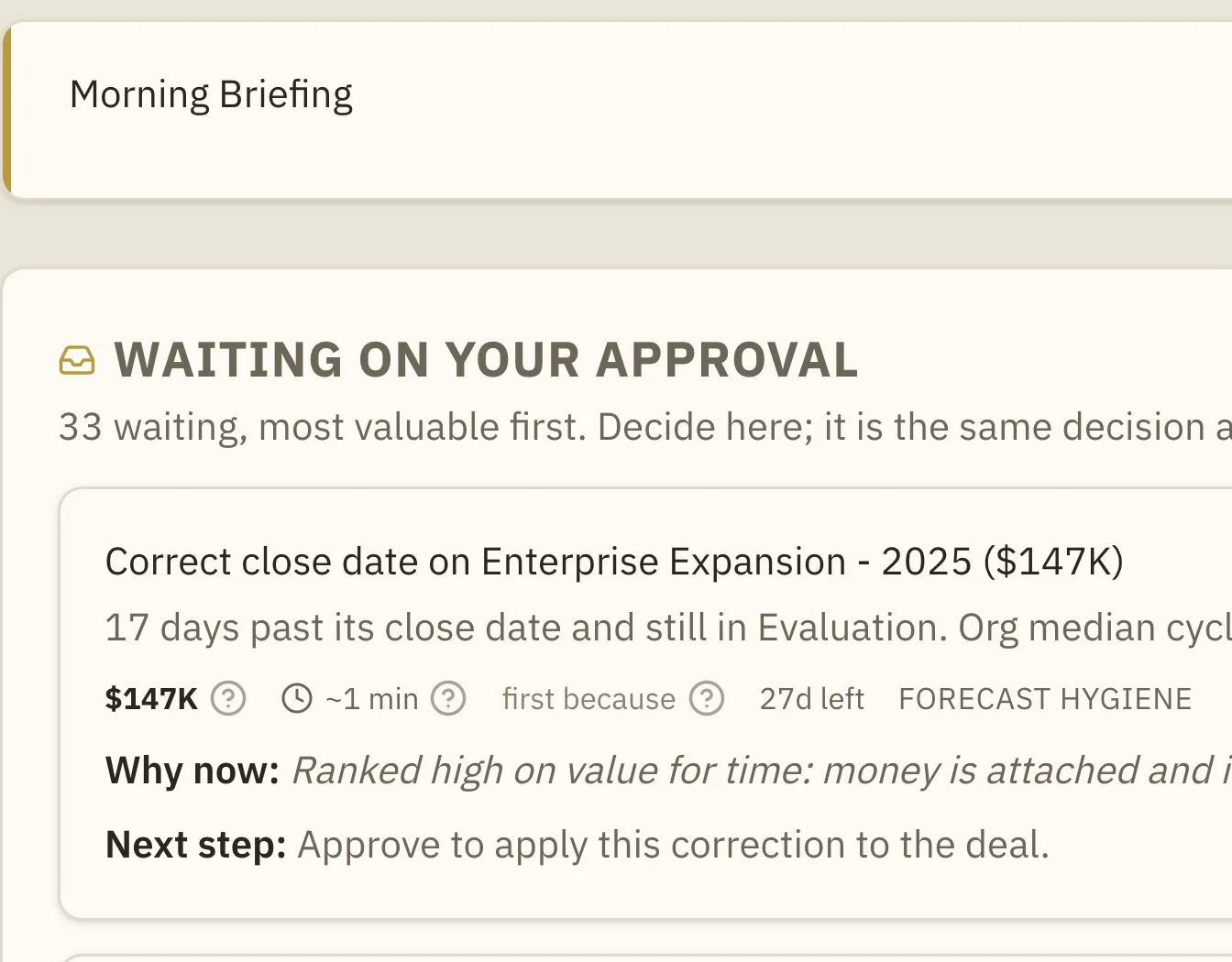
This is Approvals. Everything waiting on you, ranked by the money attached against the minutes it takes to clear. Not a list of tasks you wrote yourself.


EmpireOS Approvals: ranked work items each showing deal value, time to clear, a why-now line and a next-step line, with Approve and Later buttons.
The draft is already written Composed from the deal's own record before you arrived, not while you wait.
Watch it happen The recorded walkthrough clears a morning queue end to end, in about forty seconds.
2

The pipeline, with every card already scored

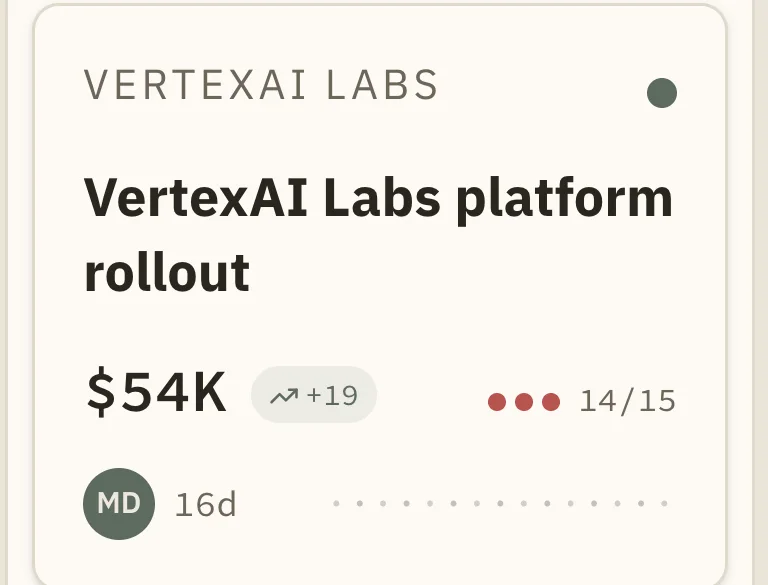
A board you can drag, like any CRM. The difference is what the cards carry: momentum, health, field completeness and days in stage, computed rather than typed in at the end of the month.

The EmpireOS pipeline board across five stages, with deal cards carrying value, momentum arrows, health dots and completeness ratios.
Totals that are always current Open pipeline and needs-attention sit under the board and move as the board moves.
Losing a deal costs you a reason Dragging to lost asks why. That is what makes step seven possible.
3

Open one deal and everything about it is on one page

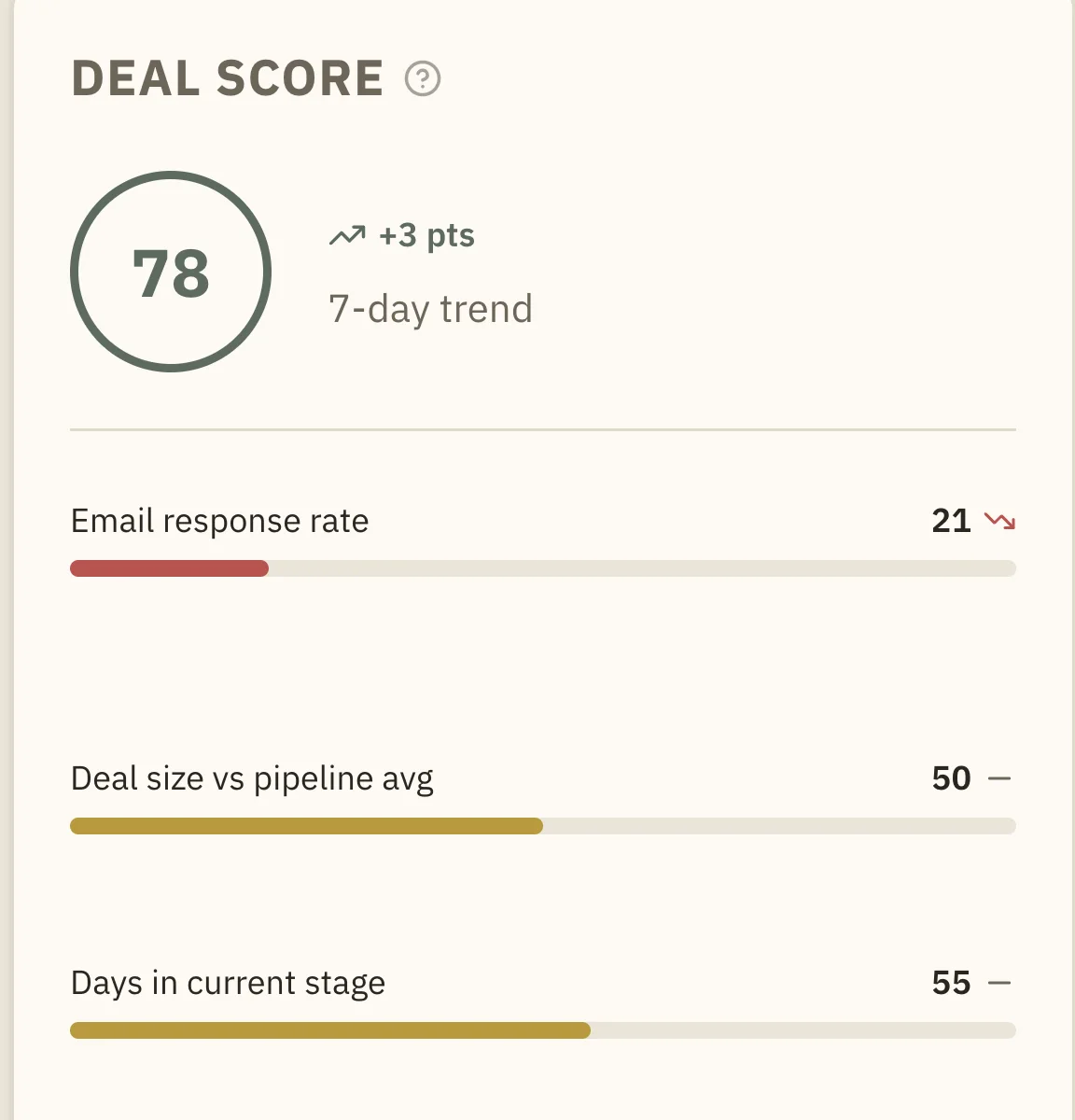
Value, stage, health with the factors behind it, the people involved, the activity history, the qualification gaps, and the brief for your next call.

An EmpireOS deal page showing the health score, stage, close date and owner, a what-your-history-says panel naming two patterns from the team's own closed deals, and the deal score broken into its contributing factors.
The brief is already there Open a deal before a call and the pre-call brief is written. Measured at about seven tenths of a second on a deal that had never been briefed.
MEDDICC without the inspection meeting Five of eight slots filled from the record, and the three that still need a human named.
4

Who has gone quiet, before it costs you the deal

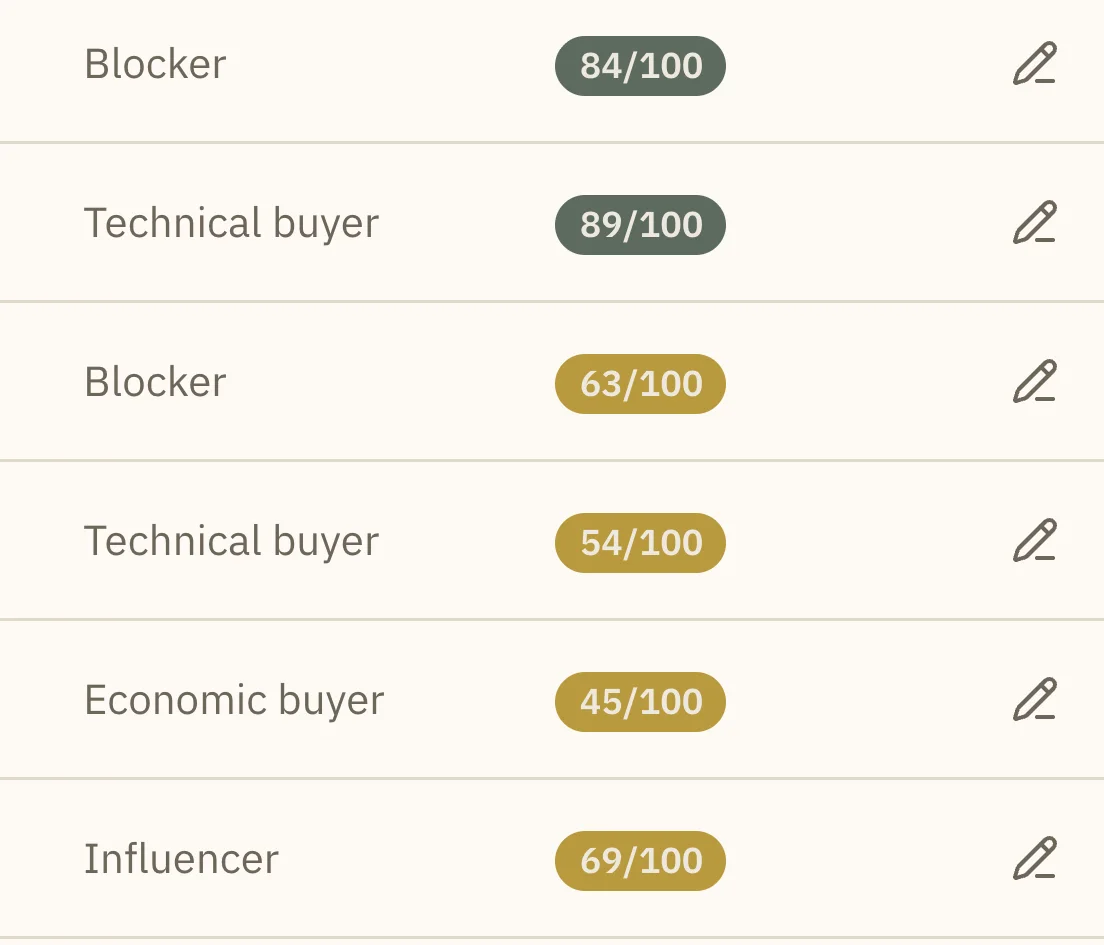
Every person your team knows, their role in the decision, and an engagement score per person. Single-threaded deals lose, and everyone finds out afterwards. This is what finding out beforehand looks like.

The EmpireOS contacts table listing every contact with their title, email, role in the buying decision and an engagement score out of 100.
Green and gold both mean something 84 is a person who replies. 44 is a procurement lead who has stopped. The color is not decoration.
The gap gets named Not just who you know. Which role in the committee you have nobody for at all.
5

Accounts are a book you can run, not a list of names

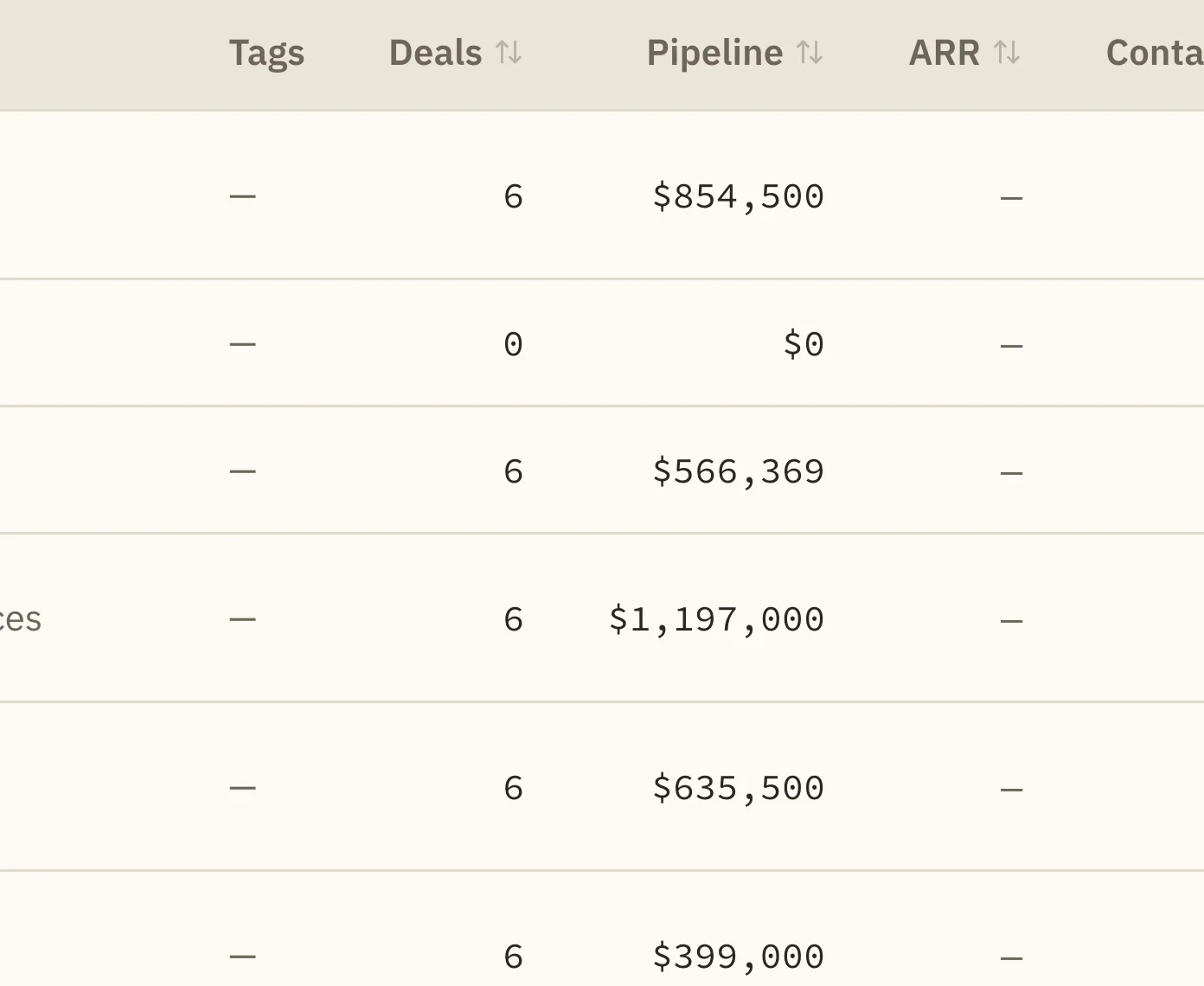
Pipeline, deal count, contacts and health per account, filterable and editable in place. Merge duplicates with a preview of exactly what will move.

The EmpireOS accounts table showing lifecycle, owner, industry, tags, deal count, pipeline value, contacts and health for each account.
Nobody maintains this It assembles itself from the deals and conversations underneath it. Thirty seconds of it, recorded.
Merges are reversible in the record Both sides keep a written history of what merged into what and when.
6

A forecast with names against it and a receipt behind it

The committed number for the quarter, which rep signed for which deals, and a permanent table of what every past quarter actually closed against what was committed at the time.

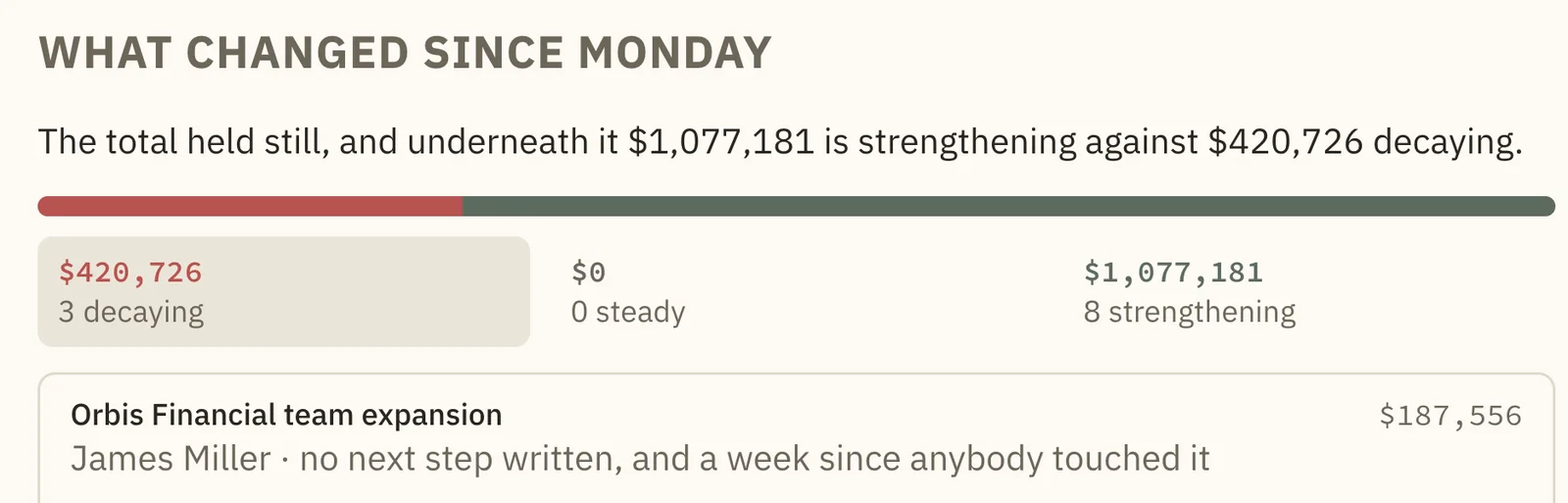
The EmpireOS forecast page showing the committed number for the quarter, the five reps who signed for it with the amount each one put their name to, and what changed since Monday.
The waterfall, on video Start, new deals in, increased, pulled in, moved into commit, slipped out, closed won, end. Watch it.
Eight views of the same number The number, the chart, the kanban, the waterfall, team roll-up, AI against rep, accuracy, and revenue at risk.
7

What your own closed deals prove

Swarm Intelligence reads your closed deals and reports the patterns the evidence supports. Every finding shows the size of the difference and the number of deals it was measured across.

The EmpireOS Intelligence page listing confirmed findings from closed deals, each with a points difference in close rate, the sample size, and a signal strength.
Evidence, not rules The page says it out loud: a deal can carry every good signal here and still be lost.
Non-decisions are excluded Deals that went dark without a decision are left out of every rate, because they are not losses the team could have influenced.
8

Ask your pipeline a question and get an answer with sources

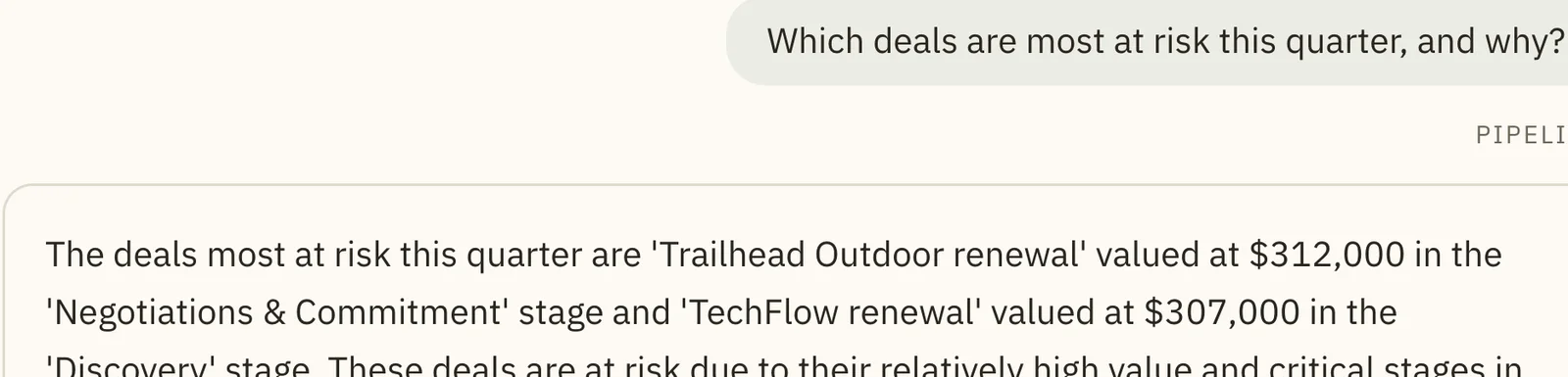
This is a real question, and that is the real answer it produced: two deals named, with their values, their scores, and why they are at risk. Then a chart, and then the action it suggests you take about it.

The Ask Empire panel answering which deals are most at risk this quarter, naming two deals with their values and scores, with a chart of deal counts by stage and a cited sources control.
It cites its sources Every answer lists the records it was built from, so you can check it rather than trust it.
Then it offers to act "Re-engage at-risk deals" is one click, and what it drafts still stops for a person.
9

The front door answers on its own

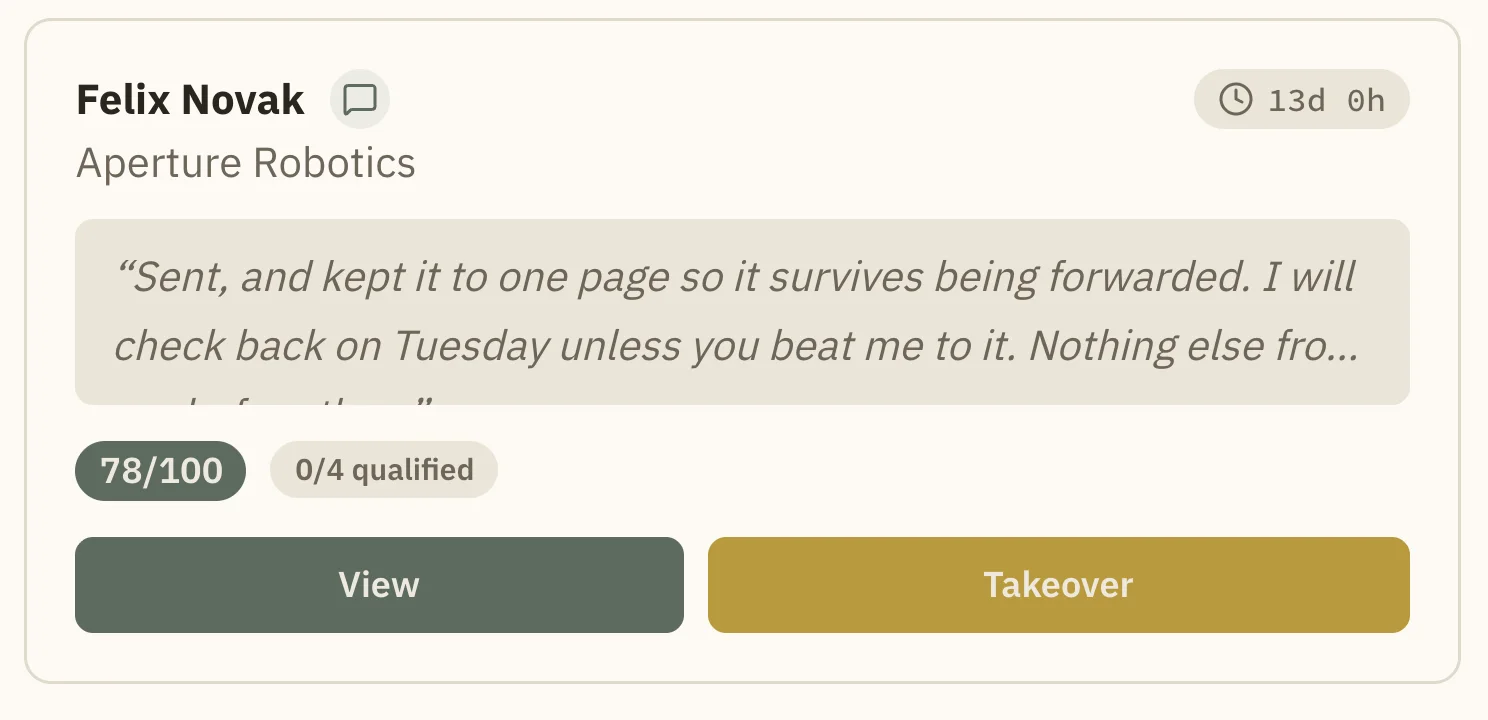
Empire Agent handles inbound and outbound over chat, voice and email. This is the view of what is live right now and everything that has come through.

The EmpireOS Agent dashboard with active conversations, leads today, average lead score, an activity feed and a live conversation panel with a takeover button.
Takeover Any live conversation can be taken over by a person mid-sentence. The agent hands across rather than talking over you.
Speed to lead Inbound is answered when it arrives, including at 9pm on a Sunday.
10

Leads scored against a framework you already use

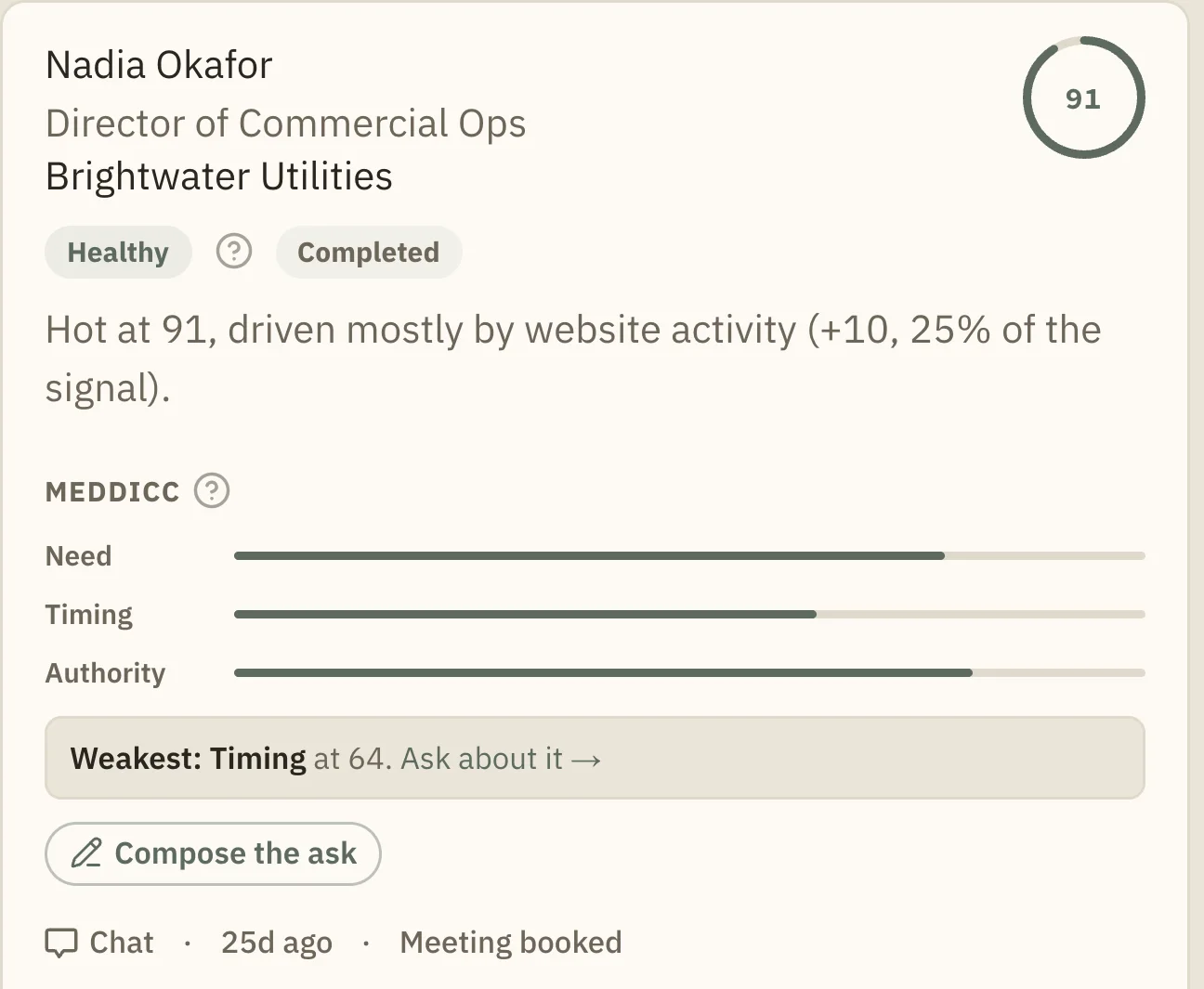
BANT, MEDDICC or SPICED, your choice. Each lead carries the per-dimension breakdown and a sentence saying what moved the score, so a rep can argue with it on specifics.

EmpireOS agent leads as scored cards, each with a score ring, a qualification framework breakdown and an explanation of the score.
Hot and cold both shown Cold leads are held rather than pushed at a rep who will ignore them, and they are labeled honestly.
Straight into the CRM A qualified lead becomes a deal in Command without anyone retyping it.
11

Coaching that points at a specific skill and a specific rep

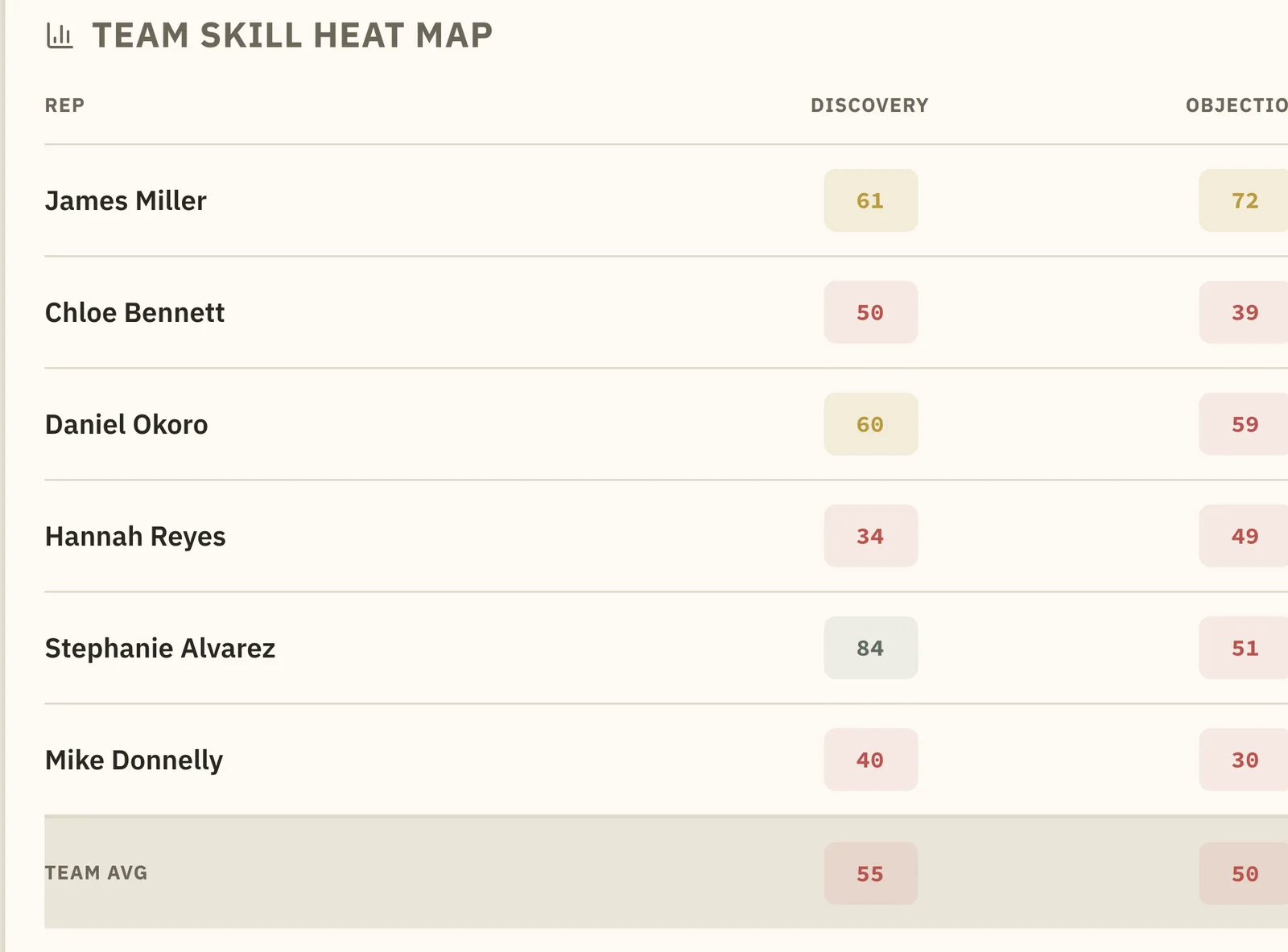
Every rep against every skill, scored from their own recorded calls. Click a cell and you are in that rep's coaching detail, with the calls the score came from.

The EmpireOS team skill heat map scoring each rep on discovery, objection handling, closing, pitch and multi-threading, with a team average row.
The weakest team skill is named Not "improve closing" in the abstract. Closing at 45 out of 100 across the whole team, with role-play drills suggested for it.
Traceable to calls Scores come from recorded and transcribed calls, so a coaching conversation can start with the recording.
12

And then it lays out your day

The same ranking, as a plan. What to do first, what is waiting on your approval, what is on the calendar, and what you promised someone you would do today.

The EmpireOS daily planner with actions ranked by dollar value, a panel of items awaiting approval, meetings and commitments.
Money against minutes The ordering rule is the same one Approvals uses, so the two never disagree.
Commitments are kept "I will come back to you Thursday" becomes something the system remembers on Thursday.

More than forty screens. One record.

Seven modules in the product's own navigation, 46 screens, counted from the navigation at build time. This site shows the surfaces that decide it, and shows them well. The rest is deliberately inside the product rather than documented here: open the trial or the live demo and it is all there, on one data layer, at one price.

  • Approvals

    Your front door. Everything the AI wants to do that needs a person, ranked by money against minutes.

    • Ranked by money against minutes
    • Money, risk and two-minute lenses
    • Signals
    • Focus Mode
    • Every decision recorded
    • 3 more inside
  • Empire Command

    The CRM the forecast comes out of.

    • Deals and the pipeline board
    • Accounts and contacts
    • Forecast and its receipts
    • Commissions
    • Recordings and coaching
    • Board deck
    • Your Day
    • Automations
  • Empire Agent

    Inbound and outbound conversations that qualify, and hand you the good ones.

    • Conversations over chat, voice and email
    • Scored leads with the reasoning
    • Demos booked
    • Outbound
    • 3 more inside
  • Deal Intelligence

    What the system knows about one deal, and why.

    • Deal score with its factors
    • MEDDICC and the buying committee
    • The deal journey
    • Pre-call brief
  • Swarm Intelligence

    What your own closed deals prove about how you win.

    • Findings with effect size and sample size
    • The Flywheel
  • Analytics

    Every number drills through to the deals behind it.

    • Revenue
    • Pipeline
    • Team
    • Dashboards you build
    • Reports you describe
    • 5 more inside
  • Ask Empire

    Plain-language questions about your own pipeline, answered from the history.

    • Ask anything about the pipeline
    • A library the answers draw on
  • Empire Launch

    Campaigns, run from inside the product.

    • Inside the trial
  • Empire Content

    The content library, on the same record as the deals.

  • Empire Enablement

    Battlecards, collateral, playbooks, a deal desk, training and the knowledge library, inside the same system rather than beside it.

  • Implementation

    Customer onboarding as projects, from templates.

    • Inside the trial
  • Governance and setup

    Who sees what, which fields exist, how the pipeline is shaped, and what connects.

    • Roles and permissions
    • Fields and the field library
    • Pipeline stages
    • Commission plans
    • Integrations
    • MCP and API keys
    • Data migration
    • 8 more inside

24 more surfaces are inside the product and not documented on this site. Every one of them is on the trial and in the live demo.

Want this walkthrough in your inbox?

We will send you this walkthrough as a link you can forward, and a short note when something worth knowing about ships. Nothing above this line is behind it, and unsubscribing is one click.

That is the tour. Now drive it yourself.

The live demo is the same product on a real workspace, and it is open right now.

Or watch the recorded walkthroughs, which are half a minute each, silent, captioned, and need nothing from you at all.

About EmpireOS

EmpireOS is the revenue system that updates itself: your pipeline, your forecast and your follow-ups kept current from the conversations your team is already having. It is an AI revenue operating system for mid-market B2B sales teams: sales forecasting, conversation intelligence, an AI sales agent (Empire Agent), deal intelligence, win/loss patterns read from your own closed deals (Swarm Intelligence) and the record they all sit on, in one system instead of separate tools that bill separately and do not share what they learn. It works alongside the CRM you already have. $129 per user per month, every module and every AI feature included. A seven-day free trial with no card required. Nothing reaches a customer without a person approving it, and the approval is recorded.

Reading this with an AI assistant?

View as Markdown